

Integration bugs don’t always break your code. Sometimes they break your accounting.
You sign up, grab your sandbox keys, and build. Every test passes. Then you go live, and a few weeks later your support team starts forwarding complaints. A customer paid but wasn’t credited. A balance doesn’t match. Your product’s numbers no longer agree with the bank’s.
Often the cause isn’t a bug in the code at all. It’s a payment feature that was never right for the product.
That was the starting point for Session 01 of Monnify Build Sessions, our new monthly live workshop for developers building payment integrations. On 27 August 2026 we tackled one question: before you write any code, how do you choose the right Monnify payment feature for your use case?
Listen to the full session: Session 01 audio recording
Download the slides and lecture notes: Session 01 deck
Why We Started Build Sessions
During the recent Monnify developer challenge, we reviewed a lot of projects. Many of them worked. But in many of them we could see a problem coming. The team had picked a feature that would work today and cause trouble later.
The documentation explains how each product works. What it usually doesn’t tell you is which product fits your business. That decision is left to you, and getting it wrong means expensive rework later, or what engineers call technical debt. Build Sessions exist to help with those decisions, one topic a month.
The Three Features People Mix Up Most
Reserved accounts: A Mailbox With Your Name On It
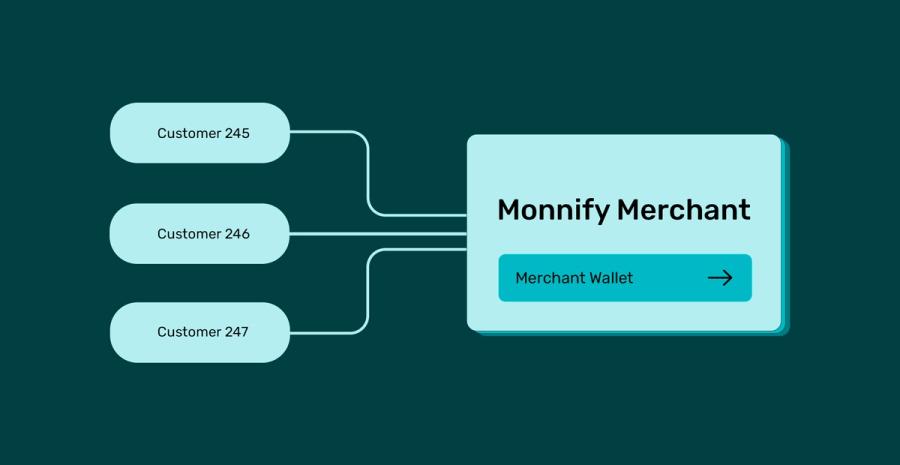
Imagine a mailbox with your name and the number 245 on it. Whatever lands in box 245 is yours, and nobody else opens it. A reserved account works the same way. Each user gets a dedicated account number that belongs to them, and every naira sent to it is attributed to them.
When you call the create reserved account endpoint, Monnify generates a standard Nigerian account number tied to an account reference you control. Because it’s a real, lasting account, it needs identity verification first (the customer’s BVN or NIN), just as a bank needs ID before it opens an account for you. Once it exists, every payment into it fires a webhook, so you always know whose money arrived.
Best for: Wallet top-ups, Savings and Ajo platforms that track each person’s contributions, and vendor accounts on multi-vendor marketplaces (think of how a Jumia or Konga seller could be paid directly).
Avoid for: one-off or guest purchases where the customer won’t come back.
Checkout: The Multi-Channel Payment Screen
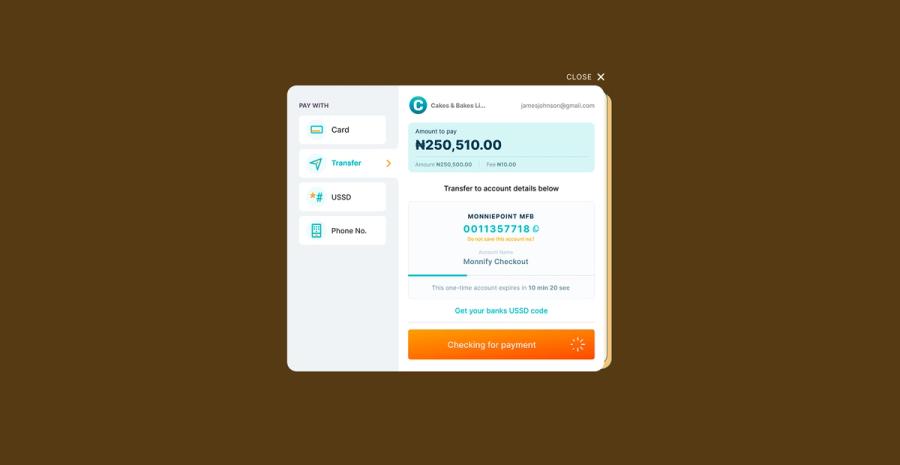
If you’ve ordered food on Chowdeck or bought something online, you’ve used a checkout. It’s a single screen where the customer picks card, transfer, USSD or bank, and pays.
When a customer chooses transfer, Checkout creates a dynamic account. This is a one-time account number for that one session. It needs no BVN or NIN, and it expires after 40 minutes.
Best for: e-commerce carts, event tickets, and any one-off purchase.
Avoid for: automated background funding. Checkout needs a person present to complete each payment.
Recurring debit: Mandates and Card Tokenisation
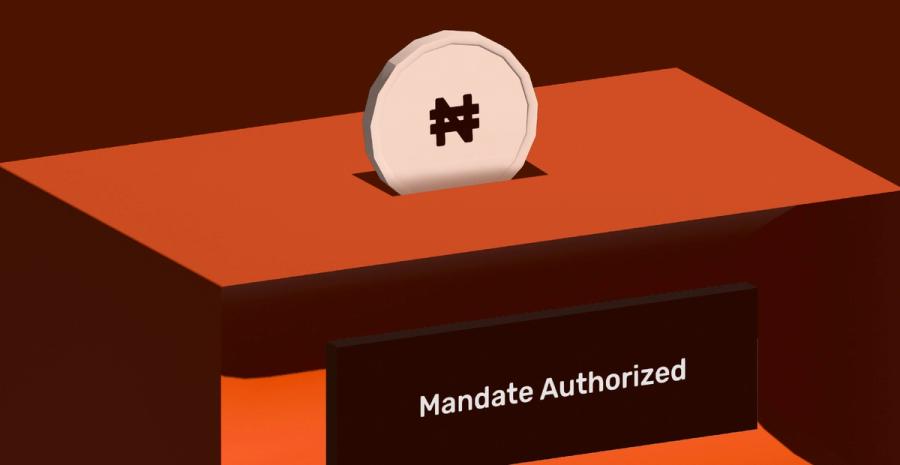
Recurring debit covers two methods:
- Mandate-based direct debit. If you’ve taken a bank loan or bought a phone on a pay-later plan, you’ve probably paid a small fee to set up a mandate. That one payment authorises the business to debit your account on a set date each month.
- Card tokenisation. You add your card once, confirm it with a token, and the business charges it on schedule. Netflix, Spotify and DStv renewals work this way.
Best for: loan repayments, subscriptions, and recurring savings contributions.
Avoid for: one-time payments or charges where the amount changes every time.
Reserved Account vs Checkout: Where it Goes Wrong
These two are the pair people confuse most, and the difference matters.
A reserved account is long-lived and belongs to one user. A checkout account belongs to one session. When the session ends, the account number is no longer yours, even though you paid into it.
Here’s a real example. A customer paid for an order by bank transfer through checkout, then saved the account number as a beneficiary in their banking app. The next day they ordered again and sent money straight to the saved number. That session was gone. The money still arrived, but there was nothing to attribute it to. We call that an orphaned transfer, and it can only be fixed by hand through support.
The rule is simple: don’t use checkout where you need a reserved account, and don’t use a reserved account where checkout fits. If you build on checkout, design for the session timer and the pending state. Don’t assume the session will still be there.
Three Case Studies
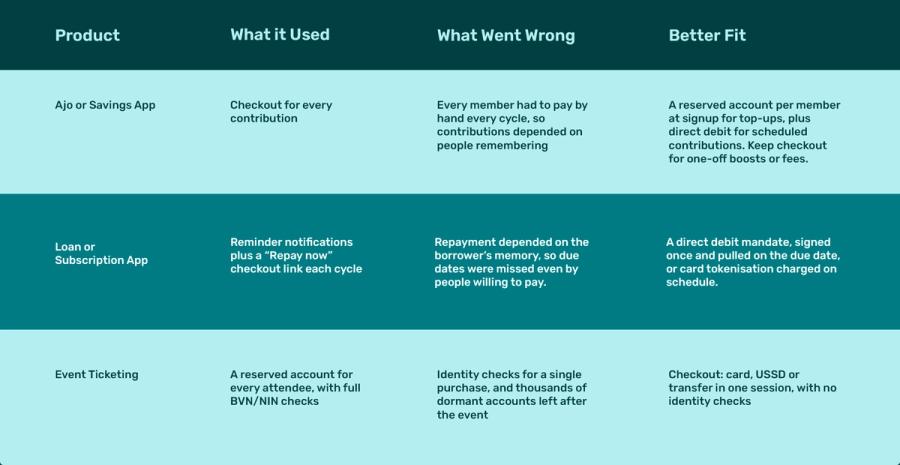
I grew up in an area where the Ajo collector went from house to house, chasing people who were late with their savings. A savings app built on checkout recreates that problem in code. You end up chasing users to come back and pay. The right feature makes the chasing unnecessary.
Three Things That Still Catch People In Production
Even with the right feature, these three issues keep coming up.
1. Missing webhooks:
Picture ordering food and waiting for the doorbell, but the order was never assigned to a rider. You’d be waiting for a delivery that isn’t coming. A webhook that never arrives feels the same. If you haven’t received a notification within roughly 2 to 5 minutes, call the transaction status endpoint yourself instead of leaving your UI waiting.
2. Idempotency:
It’s a big word for a simple idea: doing something once, safely, even when you’re asked to do it twice. If a WhatsApp message gets sent twice on a slow network, the reader still treats it as one message. Your backend should do the same. Monnify retries webhooks every 5 minutes, up to 12 times, so track the transaction references you’ve already processed and never credit the same one twice. (Session 02 covered this in depth: [Webhooks and Idempotency in Production: add link].)
3. Session expiry:
Dynamic checkout accounts expire after 40 minutes. Build your UI for that. When a session expires unpaid, tell the user the payment didn’t go through. We’ve seen integrations that sent the user to the next screen as if the payment had succeeded.
The Cheat Sheet
Keep this handy whenever you’re choosing a payment feature:
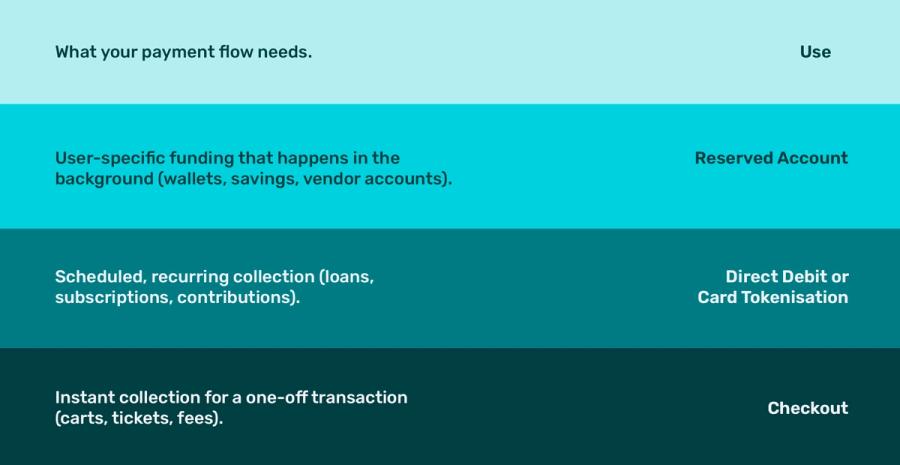
Many real products use more than one, and that’s fine. A savings app can use reserved accounts for top-ups and direct debit for scheduled contributions. Just make sure every payment, whatever the channel, lands in one internal ledger with a reference you control.
Questions From The Session
Does Monnify support international payments and USD?
Monnify is opening up international payments, starting with a select group of merchants. The pilot supports NGN and USD (not crypto), and access will gradually open to everyone.
When should we use reserved accounts instead of standard checkout?
Use reserved accounts when the same user pays you repeatedly by transfer: wallets, savings, B2B collections, and recurring invoices. Use checkout for immediate, one-off B2C payments.
Does using several payment features make reconciliation harder?
It can, which is why your architecture matters. Use consistent references and record every payment in one ledger, and card, USSD, and transfer payments reconcile in one place.
Can we hide or show payment channels based on the transaction amount?
Yes. When you initialise checkout, you can restrict which channels appear, for example, leaving out USSD above its limit.
What happens if a customer pays into an expired checkout account?
The money still arrives, but there’s no session to attribute it to. It becomes an orphaned transfer that support has to resolve by hand. Warn users on the payment screen not to save checkout account numbers.
Where can I get help after the session?
Join the Monnify Developer Community on Slack at slack.monnify.com, or reach out to the Monnify developer advocates on LinkedIn or X.