

A customer funds their wallet with ₦10,000. Monnify sends you a webhook. Your server credits the wallet but responds slowly, so Monnify sends the webhook again. Your server credits the wallet again. A wallet that should read ₦10,000 now reads ₦20,000.
Nothing crashed, and nothing looks wrong in your logs, but your ledger is now wrong.
Session 02 of Monnify Build Sessions on 3 October 2026 focused on preventing that. Muhammad Samu (Auwal MS), who leads developer relations and integrations for Monnify, walked through how to receive, verify, and process webhooks in production. He also shared the architecture he recommends. The ideas apply to any payment gateway and to webhooks in general.
Listen to the full session: Session 02 Recording
Download the slides and lecture notes: Session 02 Deck
How Monnify Delivers Webhooks
When an event completes (a collection, a disbursement, a refund), Monnify sends a webhook to your URL and waits for an HTTP 200.
If it doesn’t get one, it assumes something went wrong on your side, such as a 502 or a timed-out worker. It then retries every 5 minutes, up to 12 times, then pauses.
Those retries protect you from short outages. They also mean your system will sometimes receive the same event more than once. As Auwal put it: the sender’s job is to make sure you got the event. What you do with it, including making sure it only counts once, is your job.
Respond First, Process Later
The most common cause of duplicate webhooks is a slow handler. A typical one receives the event, updates the database, sends the customer an email, and only then returns 200. If the email service is slow, the response is late, and Monnify sends the webhook again.
The fix is to split the work in two.
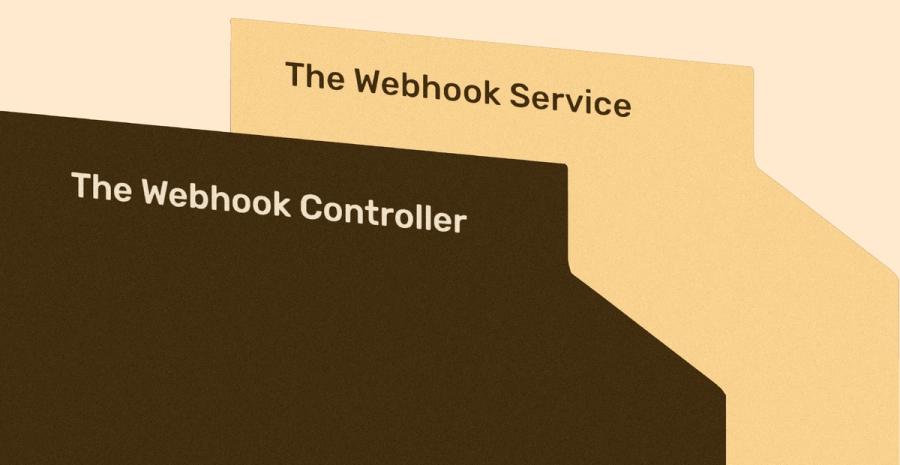
The webhook controller does only fast, safe steps, then responds:
- Verify the HMAC signature. Compute an HMAC of the raw body with your Monnify secret key and compare it to the monnify-signature header.
- Verify the source IP against Monnify’s published webhook IP. Many teams also enforce this at the server or firewall.
- If either check fails, return 401 and stop.
- Save the raw event to an append-only audit table. If you ever need to prove what Monnify sent you, it’s there.
- Push the event to a queue (Redis, BullMQ, SQS, Google Cloud Pub/Sub or similar).
- Return 200.
All of that takes about 50 milliseconds, well inside Monnify’s response window.
The webhook service then processes events from the queue:
- Take a concurrency lock on the transaction reference, so two copies of the same event can’t be processed at the same time.
- Check whether the reference has been processed. If it has, mark the event as a duplicate and skip the business logic.
- Validate the state transition. Is this event out of order, or would it move the transaction backwards? If so, flag it for investigation rather than applying it.
- Apply the update atomically. Credit the wallet, update the transaction and mark the webhook as processed in one database transaction.
- Run side effects from an outbox. Emails and notifications go out only after the update has committed.
- If processing keeps failing, send the event to a dead letter queue for manual review.
One note: Monnify currently sends the signature only in live mode, not in sandbox. A fix is planned. The IP check works in both environments.
Idempotency Is your Responsibility
An idempotent handler produces the same result whether it sees an event once or twelve times. You get there by checking a unique key before you change anything.
Which key to use depends on how the payment started:
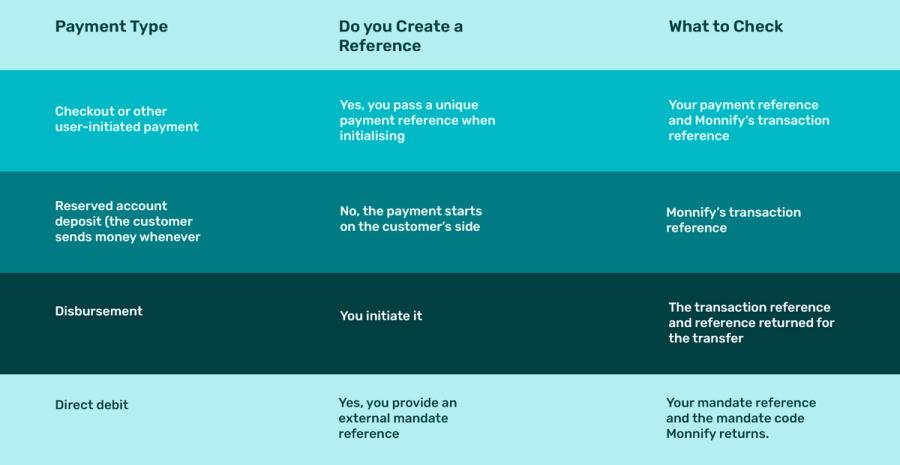
For reserved account deposits, also check that the destination account number actually belongs to one of your users. If it doesn’t, ignore the event, because it isn’t yours.
Race Conditions: Let The Database Decide
In production, many customers pay at the same time, and you can’t ask any of them to wait. Your system has to record each payment correctly and exactly once, however many arrive together.
A check like if (!alreadyProcessed) credit() in application code isn’t enough. Two copies of the same event can pass the check at the same moment. Use atomic writes with a unique constraint in PostgreSQL or another SQL database, or a ledger approach where every movement of money is an appended entry with a full trail.
Here’s the processing step in that style:
1async function processCollection(event) {
2  const { transactionReference, paymentReference, amountPaid } = event.eventData;
3  const accountNumber = event.eventData.destinationAccountInformation?.accountNumber;
4
5  await db.tx(async (t) => {
6    // The unique constraint on transaction_reference blocks duplicates,
7    // even when two copies of the event arrive at the same moment.
8    const inserted = await t.oneOrNone(
9      `INSERT INTO processed_payments (transaction_reference, payment_reference, amount)
10       VALUES ($1, $2, $3)
11       ON CONFLICT (transaction_reference) DO NOTHING
12       RETURNING id`,
13      [transactionReference, paymentReference, amountPaid]
14    );
15    if (!inserted) return; // already processed: skip
16
17    const wallet = await t.oneOrNone(
18      `SELECT id FROM wallets WHERE account_number = $1 FOR UPDATE`,
19      [accountNumber]
20    );
21    if (!wallet) throw new Error("Account not assigned to any user");
22
23    await t.none(`UPDATE wallets SET balance = balance + $1 WHERE id = $2`, [amountPaid, wallet.id]);
24    await t.none(
25      `INSERT INTO outbox (type, payload) VALUES ('PAYMENT_RECEIVED_EMAIL', $1)`,
26      [{ walletId: wallet.id, amountPaid }]
27    );
28  });
29}
If any step fails, the whole transaction rolls back. The reference isn’t marked as processed, so a retry or a replay can safely try again.
Transaction States Only Move Forward
Auwal was firm about this one: Never let a transaction move backwards.
A transaction can go from pending or failed to successful. A successful one can become reversed. It should never go from successful back to pending. If it does, the next webhook can mark it successful again, and now you have two successful events and possibly two credits.
Monnify never sends you a pending status after a success. For disbursements, the flow looks like this:
- The first event is pending (or pending authorisation).
- Then a successful disbursement event arrives, with a transaction reference and the amount.
- If the receiving bank doesn’t credit the recipient, a reversed event follows, with the same transaction reference. Move the status to reversed, not back to pending.
- If there isn’t enough balance, the event type is failed disbursement and the status is failed.
Because you log every raw event, you always have proof of what Monnify sent and why you gave value.
Route Events With A Switch Statement
Monnify sends around 14 to 16 event types. These include collections, disbursements, low-balance alerts (useful if you run payroll from your Monnify wallet) and, more recently, bill payment events for airtime, electricity tokens and exam fees.
A growing chain of if statements gets hard to manage. Use a switch on the event type, and hand each type to its own handler:
1switch (event.eventType) {
2  case "SUCCESSFUL_TRANSACTION":
3    return processCollection(event);
4  case "SUCCESSFUL_DISBURSEMENT":
5  case "FAILED_DISBURSEMENT":
6  case "REVERSED_DISBURSEMENT":
7    return processDisbursement(event);
8  default:
9    return logUnhandled(event);
10}
When The Retries Run Out
There’s no API endpoint to resend a webhook. After all 12 retries, you have three options:
- Replay it yourself:
You saved the raw event, so you can push it back through your webhook service. Because the service is idempotent, a replay can’t double-credit anyone. - Query the transaction status:
Call the Get Transaction Status endpoint with the reference and update your records. This only works if you saved the transaction reference when you initiated the payment. Auwal said forgetting to do that is one of the most common mistakes he sees. - Ask for a resend:
Email [email protected] with your business ID and the time window you need resent.
Production Checklist
☐ HMAC signature verified against the raw body; 401 on failure
☐ Source IP verified against Monnify’s webhook IP
☐ Raw events saved to an append-only audit store
☐ Controller pushes to a queue and returns 200 in milliseconds
☐ Unique constraint on the idempotency key, enforced in the database
☐ Credit, status update, and “processed” flag in one transaction
☐ Statuses only move forward; reversed is never pending
☐ Side effects (emails, notifications) sent from an outbox after commit
☐ Dead letter queue and a replay tool for failed events
☐ Transaction references saved at initiation, so you can requery
Questions From The Session
Can we rely only on the transaction reference for idempotency?
(Michael Adeyemo)
It depends on the payment type. Every payment has a transaction reference, and for reserved account deposits that’s all you’ll have, so it’s the key. For checkout payments you initiate, use your payment reference together with the transaction reference. Other events, like direct debit, carry their own references. Add extra checks too, such as confirming the destination account belongs to one of your users.
Is there an endpoint to manually push a webhook after retries are exhausted? (Ja’afar Salisu Akeel)
No. Email the integration support team with your business ID and the time window, or query the transaction status yourself. Adewuyi Taofeeq added that requerying is often the quickest route, as long as you saved the reference in your own database.
After verifying a webhook, do we still need to query the transaction status? (Afeez Onadiran)
If the HMAC signature and IP both check out, the payload can be trusted, and most businesses don’t requery. Auwal estimated a requery matches the webhook 99.99% of the time. Still, a requery is a sensible defensive step. Abubakar Hassan shared that he has seen spoofed IP addresses in practice, and recommends a zero-trust approach: HMAC, IP allowlisting, and a status check with the provider before you give value. Auwal’s summary: trust and verify.
Does a chargeback mean the webhook was wrong?
No. A chargeback is a separate dispute raised after the payment. It means the customer is asking for money back that did reach you, so the successful webhook still stands.
What’s the difference between static and dynamic reserved accounts?
A static (dedicated) reserved account is assigned to one user permanently. It’s a tier-one account, so CBN rules require a BVN or NIN. A dynamic account is a one-time account number that needs no BVN or NIN and expires once it’s used, whether the customer pays the exact amount, less or more.
Have a topic you’d like us to cover? Tell us in the 1-question survey here, or ask in the Monnify Developer Community on Slack at slack.monnify.com